Workshop
How to find models on Thingiverse and edit them with AI (without breaking the licence)
Where to find 3D-printable models, how to pick a good remix candidate, the Creative Commons licence check, and what AI can and can't edit reliably.
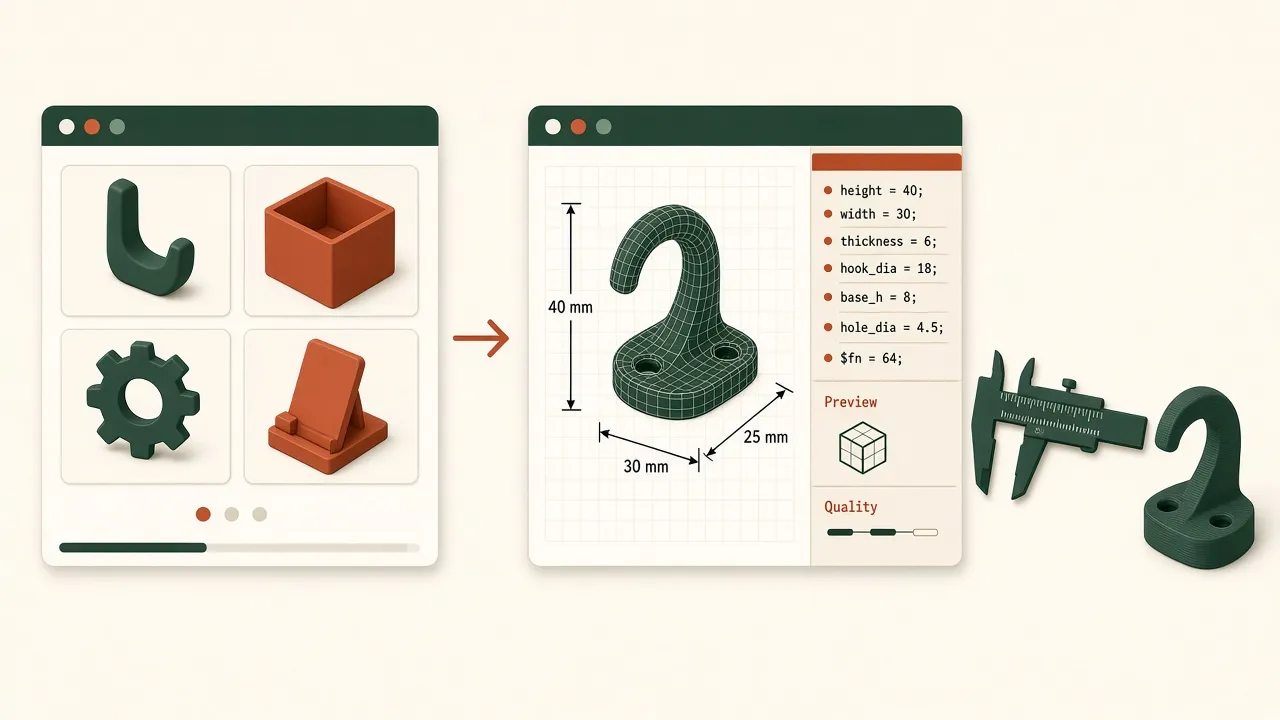
Sources: official pages from Thingiverse, the Bambu Lab Wiki (MakerWorld), the Printables terms of service, the Cults and Thangs home pages, MyMiniFactory’s acquisition announcement, Creative Commons, OpenSCAD, CadQuery and Blender, checked November 5, 2026. Short quotes only, and we don’t reproduce any model images. This is general guidance, not legal advice. None of the companies named reviewed or endorsed it.
You can find a ready-made model for almost anything, but rarely in exactly the size you need. The hook is 3 mm too narrow, or the phone stand doesn’t fit your case. AI makes it tempting to say “just make it wider.” This guide covers where to look, how to choose a model that is worth editing, the licence check to do before publishing a remix, and which AI editing methods actually work.
Where to find models
| Platform | What it is (per its own pages) | Useful for remixing | Licence options |
|---|---|---|---|
| Thingiverse | Long-running free model library, launched 2008, acquired by MyMiniFactory in February 2026 | Customizer for designs uploaded as .scad |
Set by each designer, often Creative Commons |
| Printables | Prusa’s model site | Remixes link to their parent model; uploads can include .step and .scad |
Creative Commons, GNU, BSD, Apache 2.0, CERN OHL, Open Community License and others |
| MakerWorld | Bambu Lab’s model site | Customize button (Parametric Model Maker, runs OpenSCAD) | Set by each designer |
| Thangs | Marketplace for 3D models and prints | Digital store plus a subscription bundle | Per model |
| Cults | Independent marketplace for free and paid files | Lists STL, OBJ, 3MF, STEP, SCAD, DXF and SVG among its formats | Per model; designers get 80% of the net sale price |
| MyMiniFactory | Curated marketplace, now also owns Thingiverse | Strong on miniatures and figures | Per model |
Some details worth knowing:
- Thingiverse Customizer. The Customizer page says it requires a
.scadfile. The Customizer docs say the whole script must be in a single file and cannot import external STL or DXF files. - MakerWorld. The release notes say creators who upload OpenSCAD scripts get a Customize button on the model page, and users can download an STL or 3MF of their own version.
- Printables. The terms of service list the file types you can upload, including
.stepand.scad, and the licences on offer. - Thingiverse and MyMiniFactory. MyMiniFactory announced on February 12, 2026 that it had acquired 100% of Thingiverse from UltiMaker. It said the open-sharing ethos remains, with an emphasis on “verified human-made content over AI-generated” designs.
What makes a good remix candidate
Before you look at the licence, check whether the model can even be edited well.
- Source files beat meshes. A model that ships STEP, F3D or SCAD keeps real geometry and dimensions. An STL is only triangles: there is no “hole diameter” to change, just thousands of faces you have to move.
- Parametric is best. A
.scadfile with named variables (wall = 2;) can often be adapted just by changing numbers. That is exactly what Customizer and MakerWorld’s Customize button do. Search for “customizable” or “parametric”. - Clean, manifold meshes. If all you get is an STL, it should be watertight, without holes or flipped faces. Your slicer will usually warn about errors on import. A broken mesh makes every later edit harder.
- Sensible print orientation. Does it print flat without supports? If your edit changes the orientation, layer lines may end up across a load path.
- Stated clearances. Good functional models state their fit gaps, for example “0.2 mm clearance for the lid”. Those numbers are tuned for the designer’s printer, and you will likely change them for yours.
- Makes and comments. Photos of other people’s prints show that it actually works.
The licence check before you publish
Downloading and printing for yourself is one thing. Sharing or selling a modified version is where the licence matters. Most free models use one of the Creative Commons licences:
| Licence | Remix and share? | Sell? | What you owe |
|---|---|---|---|
| CC BY | Yes | Yes | Credit the creator, link the licence, say you changed it |
| CC BY-SA | Yes | Yes | As above, and your remix must use the same or a compatible licence |
| CC BY-NC | Yes | No | Credit; non-commercial only |
| CC BY-NC-SA | Yes | No | Credit, non-commercial, same licence |
| CC BY-ND | Change it only for yourself; don’t share the modified version | Unmodified copies only | Credit |
| All rights reserved / standard file licence | Ask the designer | Ask the designer | Read the terms on the page |
Creative Commons’ own remixing guidance says that under NoDerivatives “you can make and use changes privately but you cannot share your adaptation”. Under ShareAlike, you must license the adaptation “under the same or a compatible license.”
Practical habits (not legal advice):
- Attribute properly. Give the title, the creator, a link to the original, the licence with its link, and a note of what you changed. Creative Commons has a guide to recommended attribution. Use the platform’s remix link where it has one, so the credit travels with the file.
- Combining two models with conflicting licences, such as one NC and one allowing commercial use, may be impossible to publish. Printables will block the remix in that case.
- Plan to sell prints? Check for NC before you spend an hour editing. Our foldable phone stabilizer pad write-up is a real example: that MakerWorld model is itself a remix, listed under BY-NC-SA, so prints of it should not be sold.
- AI does not launder a licence. Asking a chatbot to “redraw” someone else’s design does not turn it into your own work. If the original is ND or all-rights-reserved, measure your problem and design from scratch.
- Check the platform’s rules about AI. MyMiniFactory has announced a zero-tolerance policy for AI-generated 3D models on its platforms. Read the current rules before uploading AI-assisted work to any site.
How to actually edit with AI
Ranked from most to least reliable:
1. Rebuild it parametrically from measurements (best)
Don’t convert the STL. Measure the original, or better, the thing it has to fit, and ask a chatbot for an OpenSCAD or CadQuery script with named dimensions. You get a clean, editable model, and you can change any number later. This is the approach in how to make a 3D-printable part with AI. AI CAD tools vs ChatGPT compares chatbots with dedicated tools for this, and our best text-to-CAD tools list covers the dedicated tools in more detail.
2. Wrap the STL in code (good for small additions)
OpenSCAD can import() an STL and combine it with new geometry: union a tab, difference a bigger hole, scale it in one axis. A chatbot can write that wrapper well. It cannot see inside the mesh, though, so you must give it the coordinates (measure them in your slicer or a mesh viewer). Thingiverse’s Customizer does not allow imported STLs, so this only works on your own computer.
// Remix of "Example Hook" by <creator>, CC BY 4.0 — widened and new screw hole
difference() {
  union() {
    import("original_hook.stl");
    translate([0, -2, 0]) cube([30, 4, 6]);   // extra back plate
  }
  translate([15, 0, 3]) rotate([90,0,0]) cylinder(d=4.5, h=20, center=true, $fn=48);
}
3. Blender with an AI assistant (mixed)
Blender edits meshes directly, with tools such as Boolean modifiers. Community add-ons such as BlenderMCP let a chatbot drive Blender. Its page says it is “not affiliated with the official Blender Foundation.” This suits organic and decorative models. For precise mechanical edits it is slow, and you need to check every dimension yourself.
4. AI mesh generators such as Meshy or Tripo (decorative only)
Meshy describes itself as an AI 3D model generator from text and images, and Tripo offers similar generation. They are fun for figurines and props. They do not edit an existing part to a dimension, and their output usually needs mesh repair before printing. Don’t use them for anything that has to fit.
Converting a mesh to CAD: know the limits
Some CAD programs can turn a mesh into a solid. On a faceted STL, the result is a solid made of thousands of flat faces, not real cylinders and planes. Fillets and holes don’t become editable features. For a simple functional part, re-modelling from measurements is usually faster and cleaner.
Be honest with yourself: AI editing of meshes is unreliable today. The AI produces text and code well, and remixing works best when the part is code.
Step-by-step workflow
- Find a candidate, preferably one with STEP or SCAD files, and read its comments and makes.
- Check the licence against what you plan to do: keep it private, share it, or sell it.
- Measure what it has to fit, with calipers, and write the numbers down.
- Ask the AI for a parametric rebuild, or an OpenSCAD wrapper for small changes. See the prompt below.
- Render and check dimensions in OpenSCAD, then import into your slicer. Our Bambu Studio vs xTool software guide explains what the slicer handles.
- Print a test slice, for example just the clip section, adjust, then print the whole part.
- Publish with credit if the licence allows: link the parent, use a compatible licence, and describe the changes.
Sample prompt
I’m remixing a wall hook (original: “
” by <creator>, CC BY 4.0 — I will credit it). Write an OpenSCAD script from scratch with named variables at the top, in millimetres: hook inner width 22, hook depth 30, plate 40 × 60 × 5, two countersunk holes for 4 mm screws 40 mm apart, 2 mm fillet on the hook tip. Print orientation: flat on its back. Wall thickness at least 3 mm. Put a comment at the top crediting the original and noting what changed. Don’t import the STL.</p> </blockquote> <p>Then check that the code renders, measure the preview, and adjust the variables yourself before you print.</p> <h2 id="limitations">Limitations</h2> <ul> <li>Platform features (Customizer, Customize button, remix linking) change. Check the current pages.</li> <li>Licences in the table are the general rules. The model page’s exact licence and any extra terms take precedence.</li> <li>Remixed functional parts inherit none of the original’s testing. Treat load-bearing parts as new designs.</li> </ul> </div><section class="faq" id="faq" aria-labelledby="faq-heading"><h2 id="faq-heading">FAQ</h2><article class="faq-item"><h3>Can ChatGPT or another chatbot edit an STL file directly?</h3><p>Not reliably. An STL is just triangles, with no dimensions or features to change. Chatbots do much better writing OpenSCAD or CadQuery code that rebuilds the part from measurements, or code that adds simple features to an imported STL.</p></article><article class="faq-item"><h3>Can I remix a model with a CC BY-ND licence?</h3><p>You can change it for your own private use, but the NoDerivatives term means you should not share the modified version. Creative Commons says so in its remixing guidance.</p></article><article class="faq-item"><h3>Can I sell prints of a remix?</h3><p>Not if the original is NonCommercial (BY-NC, BY-NC-SA or BY-NC-ND). If you plan to sell, start from a model whose licence allows commercial use, or design your own. This is not legal advice.</p></article><article class="faq-item"><h3>What does ShareAlike mean for my remix?</h3><p>If the original is BY-SA or BY-NC-SA, a remix you share must use the same or a compatible licence. Printables enforces this when you link a remix to its parent.</p></article><article class="faq-item"><h3>Can I upload an AI-edited remix anywhere?</h3><p>Check the platform's rules first. MyMiniFactory, which now owns Thingiverse, has announced a zero-tolerance policy for AI-generated 3D models as part of its SoulCrafted movement. What counts as AI-generated versus AI-assisted is up to the platform.</p></article><article class="faq-item"><h3>Is this sponsored?</h3><p>No. None of the platforms or tools named here have reviewed, paid for, or endorsed this article.</p></article></section><aside class="print-yourself" aria-label="Print it yourself"><p class="eyebrow">Print it yourself</p><p>A printer on the bench is enough for a lot of these clips, knobs, and jigs.<a href="/printers">The printers we recommend</a> are Bambu Lab machines. Sizes, materials, and prices stay on their site.</p><p><a href="https://bambulab.com/en" target="_blank" rel="noopener noreferrer">Bambu Lab</a></p><p class="fine affiliate-note">We may earn a commission if you buy through this link. <a href="/disclosure">Affiliate disclosure</a>.</p></aside><section class="related" aria-labelledby="related-heading"><h2 id="related-heading">Related use cases</h2><div class="card-grid"><article class="card-wrap" data-category="workshop" data-draft="false"><a class="card" href="/use-cases/how-to-make-3d-printable-part-with-ai"><span class="pill">Workshop</span><h3>How to make a 3D-printable part with AI, step by step</h3><p>A practical workflow for turning a plain-English description into a printable STL with ChatGPT, Claude, or a text-to-CAD tool, plus the checks before you print.</p><p class="card-meta"><time datetime="2026-11-04">November 4, 2026</time></p></a></article><article class="card-wrap" data-category="home" data-draft="false"><a class="card" href="/use-cases/foldable-phone-stabilizer-pad"><span class="pill">Home</span><h3>A Codex-designed magnetic stabilizer pad for a foldable phone</h3><p>Charlie Chapman had Codex design a 3D-printed pad that holds a foldable phone flat on a MagSafe puck for drawing. What it does, how it was made, and how to print one.</p><p class="card-meta"><time datetime="2026-11-05">November 5, 2026</time></p></a></article><article class="card-wrap" data-category="workshop" data-draft="false"><a class="card" href="/use-cases/best-text-to-cad-tools-2026"><span class="pill">Workshop</span><h3>Best text-to-CAD tools in 2026: an honest comparison</h3><p>Windchime, Kimi 3D Make, Confetti, Zoo, and chat models with OpenSCAD compared by output format, best use, and limits, based on public documentation.</p><p class="card-meta"><time datetime="2026-11-04">November 4, 2026</time></p></a></article></div></section></div></div></article></main><footer class="site-footer"><div class="wrap footer-grid"><div class="footer-brand"><strong>Vibe Manufacturing</strong><ul class="footer-links"><li><a href="/use-cases">Use cases</a></li><li><a href="/topics">Topics</a></li><li><a href="/printers">Printers</a></li><li><a href="/what-is-vibe-manufacturing">What it is</a></li><li><a href="/about">About</a></li><li><a href="/privacy">Privacy</a></li><li><a href="/disclosure">Affiliate disclosure</a></li><li><a href="/rss.xml">RSS</a></li></ul><p class="colophon">Cost and time figures on this site are estimates, not quotes. Named shops are examples, not partners. Read their current design rules before you order.</p></div></div></footer></body></html>