Workshop
STL vs STEP vs 3MF vs DXF vs Gerber: which file to send
Which file does a print farm, laser shop, CNC house or PCB fab want? A plain guide to STL, 3MF, STEP, DXF and Gerber, and how to ask AI for the right one.
Sources: format documentation cited inline, including Prusa’s 3MF article, the 3MF Consortium, ISO 10303 for STEP, and Ucamco’s Gerber page. A shorter version of this comparison already lives in the advanced guide. This page is the standalone reference. Nobody named here has reviewed or endorsed it.
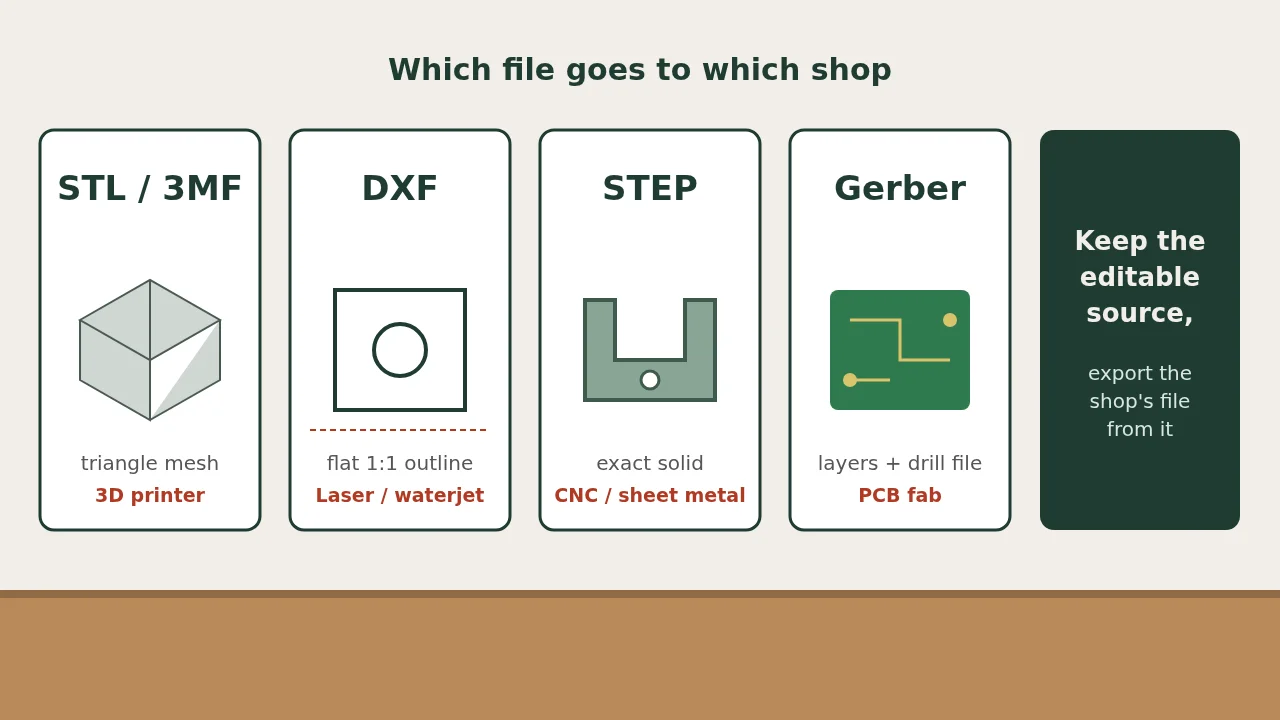
Send STL or 3MF to a 3D printer, STEP to a CNC or sheet-metal shop, DXF to a laser cutter, and Gerber files to a PCB fab. Most rejected orders come from sending a file the process cannot read, not from a bad design.
AI tools will hand you whatever format is easiest for them. This page tells you which one to ask for. The process choice itself is in print, laser-cut, or order a PCB.
The quick answer
| You are ordering | Send | Also accepted | Do not send |
|---|---|---|---|
| A 3D print | 3MF or STL | STEP, at most services | A DXF |
| A flat laser-cut or waterjet part | DXF | SVG at hobby shops, STEP at some services | An STL |
| A bent sheet-metal part | STEP | A flat DXF plus a bend drawing | An STL |
| A CNC-machined part | STEP | A PDF drawing for tolerances and threads | An STL |
| A bare circuit board | Gerber files plus a drill file | A KiCad project, at some fabs | A picture of the board |
| An assembled circuit board | Gerbers, drill file, BOM and placement file | — | Gerbers alone |
Shops differ. Read the upload page of the one you choose before you export.
STL: the default for printing
An STL describes a surface as triangles. Every slicer opens it, and that is its whole appeal.
It has three weaknesses:
- No units. The file stores numbers, not millimeters or inches. A part that arrives 25.4 times too big or too small was read in the wrong unit. Prusa’s 3MF article calls STL objects “proportionless.”
- No true curves. A hole is a polygon. Export at a fine resolution or round holes print with flat sides.
- Hard to edit. You cannot change one dimension. You go back to the source and export again.
3MF: the better print file
3MF is also a mesh, but it stores units, colors and several bodies in one file. Slicer projects saved as 3MF can keep print settings too. It is an open standard, now ISO/IEC 25422:2025 per the 3MF Consortium.
Use it for multi-color prints and whenever a print service accepts it. Fall back to STL only when the uploader refuses 3MF.
STEP: the file for anything machined or bent
A STEP file holds exact geometry under ISO 10303 (the .step file encoding is part 21). A cylinder is a cylinder with a real diameter, not a ring of facets.
CNC and sheet-metal shops need that. Their software finds holes, bends and flat faces from the solid and prices the job from it. A mesh gives it nothing to measure. Zoo’s CNC machining beta, for example, accepts a STEP file or a KCL file and does not accept an STL on its own. For flat parts, the AI to DXF guide covers the 2D route.
STEP is also the format to keep as your master copy. You can always make an STL from a STEP. Going the other way is slow and lossy.
DXF: flat outlines for lasers and waterjets
A DXF for cutting is a 2D drawing of the part seen from above. The laser follows the lines.
Check four things before uploading:
- Scale is 1:1 and you know whether the units are millimeters or inches.
- Every outline is closed. A gap of a hair’s width stops the cut path.
- No duplicate lines. Stacked lines get cut twice and burn the edge.
- Only cut geometry. Delete dimensions, title blocks and notes.
Gerber: one file per board layer
A PCB order is a zip of files, not one file. Each Gerber draws one layer: copper, solder mask, silkscreen, board outline. A separate drill file lists the holes. Ucamco, which maintains the format, calls Gerber the de facto standard for board data transfer.
For assembly the fab also needs a bill of materials and a placement file, sometimes called a centroid or pick-and-place file.
Open the zip in a Gerber viewer before ordering. If the outline or the drill holes are missing there, they are missing at the fab. That is also the review in our PCBCraft and mute-button articles.
What AI tools give you, and what to ask for
| Tool type | Usual output | What to ask for |
|---|---|---|
| Chatbot writing OpenSCAD | Code that renders to a mesh | “Put every dimension in a variable at the top.” Export STL or 3MF yourself. |
| Chatbot writing CadQuery or build123d | Code that produces solids | “Export a STEP file.” |
| Text-to-CAD app | STEP or STL, depending on the app | STEP if it is offered, then convert as needed. See the best text-to-CAD tools. |
| Image-to-3D generator | A mesh such as OBJ or GLB | Fine for figurines. Not for parts that must fit. |
| AI PCB assistant | A KiCad project or Gerbers | The KiCad project, so you can run the design-rule check yourself. |
If you remember one rule: ask for the editable source and the exact format, then make the shop’s file from that.
Converting between formats
- STEP to STL or 3MF: easy. Any CAD program or slicer does it.
- STEP to DXF: easy for flat parts. Export the top face as a 2D drawing.
- STL to STEP: hard. Converters wrap the triangles in a solid, which shops can open but not measure well. Rebuild the part instead.
- A picture to anything: not a conversion. It is a redraw.
Pre-upload checklist
- The format matches the process in the table above
- Units are stated in the order notes
- You measured one known dimension in a viewer after export
- One part per file, unless the shop asks otherwise
- The file name carries a version, such as bracket-v3.step
FAQ
Can I send an STL to a laser cutter?
No. A laser needs a flat outline. Export a DXF of the part's face from the original design, at 1:1 with closed contours and stated units.
Is 3MF better than STL?
For printing, yes. It keeps units and colors. STL is still the format every tool accepts, but it has no units and a hole is only a ring of facets.
Why does the shop want STEP when my STL looks fine?
Its quoting software reads exact faces, holes and bends. A mesh has none of those. Keep STEP as the master file and make an STL from it when you need to print.
Can ChatGPT or Claude create a STEP file?
Not by writing it out as text. They can write CadQuery or similar code that exports one when you run it, and some connect to CAD programs that export it for you.
Is this page sponsored?
No. Shops and tools are named as examples. None of them reviewed or endorsed it.