Workshop
Vibe CAD vs vibe coding vs vibe manufacturing
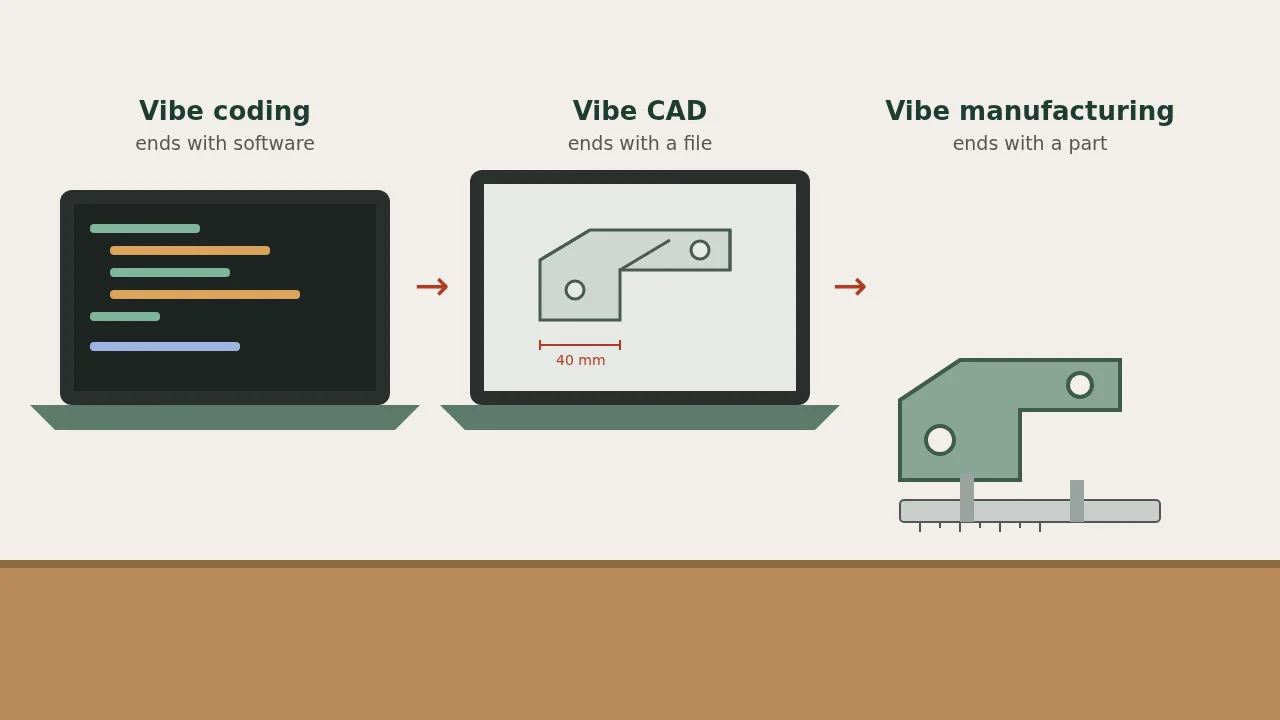
Vibe coding makes software. Vibe CAD makes a design file. Vibe manufacturing ends with a part in your hand. Here is where each one starts and stops.
Sources: Andrej Karpathy’s February 2, 2025 post on X (original, also archived); the V1 Engineering forum thread Vibe CADing 2025 Q1, opened March 29, 2025; MIT News, December 5, 2025, on the Speech to Reality system; and The Next Byte Podcast episode 237, Vibe Manufacturing: MIT’s AI Text-to-Manufacturing System, published December 23, 2025. This is an independent explainer. Nobody named here has reviewed or endorsed it.
Vibe coding ends with software. Vibe CAD ends with a design file. Vibe manufacturing ends with a physical part. The three share one habit: you describe what you want in plain language and let an AI model write the first draft.
The names get mixed up because the middle step is the same in all of them. This page separates them, so you know what someone is promising when they use one. For the practical loop on this site, start with getting started with vibe manufacturing and what vibe manufacturing is. For the file types behind the “you end up with” column, see the file-format notes in best text-to-CAD tools.
The short version
| Term | You describe | The AI writes | You end up with |
|---|---|---|---|
| Vibe coding | An app or feature | Source code | Running software |
| Vibe CAD (also “vibe CADing”, “vibe modeling”) | A shape with dimensions | CAD code or a 3D model | An STL, STEP or DXF file |
| Vibe PCB design | A circuit and its parts | A schematic and board layout | Gerber files (see what broke in AI-designed PCBs) |
| Vibe manufacturing | A physical need | Any of the files above | A made part, printed, cut, machined or fabricated |
Vibe coding: where the name came from
Andrej Karpathy coined “vibe coding” on February 2, 2025, in a post on X (archived copy). He meant building software by talking to a model and accepting its code without reading every line. In that post he wrote that he would “Accept All” and “don’t read the diffs anymore,” and that it was “not too bad for throwaway weekend projects.”
The idea spread because software forgives mistakes. If the code is wrong, you run it again. Nothing is wasted except a few minutes.
Vibe CAD: the same habit, pointed at geometry
Vibe CAD applies that habit to shapes. You tell a chatbot or a text-to-CAD tool “a bracket 40 mm wide with two 4 mm holes” and it returns a model. The best text-to-CAD tools page is the list; ChatGPT vs text-to-CAD apps is the choice between a chatbot and a specialist app.
The name was already in hobbyist use in early 2025. On March 29, 2025, a V1 Engineering forum thread titled “Vibe CADing 2025 Q1” asked how people were getting models from AI-written OpenSCAD and Fusion 360 Python scripts. “Vibe modeling” is used the same way.
Vibe CAD stops at the file. A model on a screen has not been checked against a real object, a real material or a real machine.
Vibe manufacturing: the file is the halfway point
Vibe manufacturing covers the whole route: describe the part, let AI draft the file, check the draft, then have it made. The making can happen on your own printer or at a laser shop, a CNC house or a PCB fab.
The phrase has since been used for that wider route. We can’t date its first use, and we don’t claim to. What we can point to: MIT’s write-up of its Speech to Reality system, published December 5, 2025, does not call it “vibe manufacturing”. A podcast episode published December 23, 2025, The Next Byte, episode 237, did use the phrase in its title for that MIT work. A podcast title is not proof that MIT coined the term, and this page is not an origin story. In November 2026, Business Insider ran a piece on the phrase that we summarize in AI to DXF for laser-cut parts.
Two things separate vibe manufacturing from vibe CAD:
- A check step. You compare the draft with the real object before paying for anything. A printed test piece or a paper template counts.
- A shop’s rules. Every process has limits on wall thickness, hole size and bend radius. The file has to pass them.
Why the difference matters
A software bug costs a re-run. A wrong part costs material, shipping and days of waiting. A wrong part on a load path can hurt someone.
So the vibe-coding habit of accepting output unread does not carry over. In vibe manufacturing you read the dimensions every time. That is why how to make a 3D-printable part with AI and first-print fit tips spend so much time on measurement.
| Vibe coding | Vibe manufacturing | |
|---|---|---|
| Cost of a mistake | Minutes | Money and days |
| How you test | Run it | Measure it, then make a cheap test piece |
| Who sets the limits | The runtime | The material and the shop’s design rules |
| Safe to accept unread? | Sometimes, for throwaway projects | No |
Which term fits what you are doing?
- You asked a chatbot for an STL and have not made it yet: vibe CAD.
- You printed it, fixed the fit and printed it again: vibe manufacturing.
- You had AI write firmware for the board inside it: vibe coding, inside a vibe-manufacturing project.
Most real projects use more than one. A smart desk gadget needs a case (CAD), a board (PCB) and firmware (code).
Examples on this site
None of these are our own builds. Each is a creator’s project we summarize, with a link to the source:
- Windchime is a free text-to-CAD tool. It stops at a model, so it is vibe CAD until someone prints the result.
- Matt Green’s classic Mini speedo adapter goes from photos and caliper numbers to a printed part: vibe manufacturing.
- Claude Code designing a lathe-controller PCB goes from a PCB design to a board made at JLCPCB: vibe PCB design that reached fabrication.
The loop on this site is the same each time: measure, prompt, prototype, review, fabricate.
FAQ
Is vibe CAD the same as text-to-CAD?
Nearly. Text-to-CAD names the tool category. Vibe CAD names the way of working, which also includes photos, sketches and back-and-forth correction.
Is vibe manufacturing just 3D printing with AI?
No. 3D printing is one way to make the part. Laser-cut sheet, CNC-machined metal and fabricated circuit boards count too.
Do I need to know CAD?
Not to start. You do need to measure accurately and to open the file and check its dimensions before you make it.
Can I use it for parts that carry load or keep people safe?
Not without an engineer. Keep to brackets, holders, knobs, jigs and enclosures. Skip anything that holds a person, a vehicle component or mains voltage.
Is this page sponsored?
No. People, tools and publications are named as sources. None of them reviewed or endorsed it.